📅 Published: August 24, 2023 🔄 Updated: March 18, 2026
What is Block Coding for Kids?
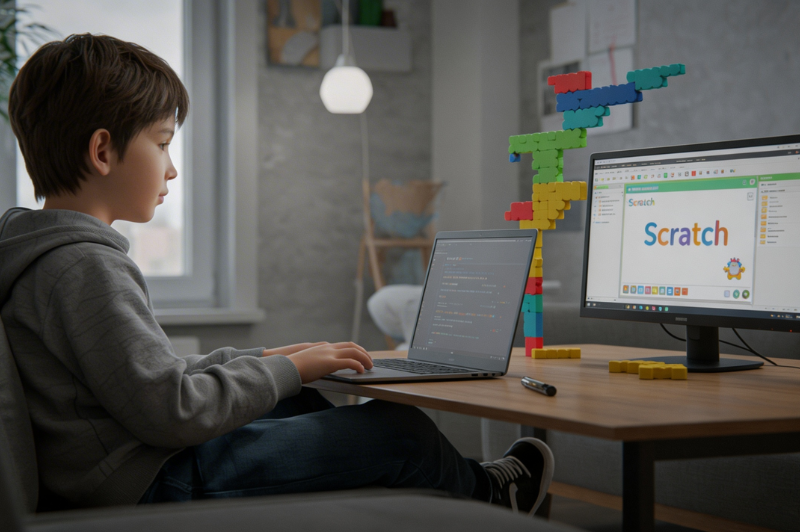
Many parents meet coding through a school task, a game app, or a child asking how something moves on screen. That usually leads to one question: What is block coding for kids? It is a visual way to code by dragging blocks that represent actions, rules, and events. Children connect them in order and watch the result. For families exploring block coding for kids, the main advantage is easy visibility. A child can see the instruction, test it, and notice what changed. This makes early coding less confusing. Block-based coding for children still teaches real ideas such as sequence, repetition, conditions, events, and debugging.
Why Block Coding is Ideal for Children?
Children learn faster when they can connect an action to a result without delay. Block coding helps with that. A child moves one block, runs the project, and sees what changed right away. That quick feedback keeps early learning clear. It also removes the pressure of typing every command correctly on day one. Young learners can focus on order, patterns, and simple logic first. Parents benefit too. The code is visible, which makes it easier to talk through a project at home. A parent can ask what each block does, why something repeats, or what changed after a fix. That makes block coding easier to support.
Top Benefits of Block Coding for Kids
Kids Can Read What They Made
The blocks are right there on the screen. Children can look at them and follow the order. That is a real advantage in block coding for kids. They do not have to guess what the program is trying to do.
Errors Feel Easier to Fix
A child can pull one block out, try another one, and run the project again. That makes mistakes feel smaller. One of the useful benefits of block coding for kids is that fixing something does not feel too hard at the start.
It Gives Kids Something Fun to Build
Children can make short games, little stories, quizzes, or moving scenes. That keeps interest alive because they are building something they can actually use.
It Prepares Them for Harder Coding Later
Blocks teach rules, repeats, and actions early. Those ideas help later when typed code enters the picture.
Best Age to Start Block Coding for Kids
There is no fixed age that works for every child. The better marker is readiness. A child can usually begin when they can follow short instructions, notice simple patterns, and stay with a small task without getting upset too quickly. Very young learners may start with icon-based or story-based tools before moving into fuller block coding for kids platforms. Many children between 7 and 12 are ready for projects with rules, events, and simple game actions. At that stage, they can usually handle sequencing and small rounds of trial and error. If the child enjoys solving short problems, the timing is probably right.
How Block Coding Works: Key Concepts for Kids
Blocks & Visual Programming Basics
A block gives the computer one job to do. Children drag blocks into place and join them to create movement, sound, pauses, or reactions on the screen. With block coding for kids, they can look at the row of blocks and follow the order without much confusion. One block runs first. Another follows after it. The child can see the flow right in front of them.
Loops and Conditionals in Block Coding
Loops help children repeat an action without rebuilding it every time. A character can jump five times, keep walking, or stop after reaching a point. Conditions add simple choices to the project. While exploring block coding for kids, children begin to notice how one rule can change the result. That is usually where coding starts to feel less random and far easier to read.
Event-Driven Logic
Events control when something begins or reacts. A click can start the game. A key press can move a character. Two objects touching can change the score. Children usually enjoy this part first because the project responds right away.
Popular Block Coding Platforms for Kids
Scratch
Scratch is still a strong starting point for many families. It is linked from Blockly’s official site as a major block-based education product, and Scratch resources for families include activities, coding cards, and videos that help children create projects at home.
ScratchJr
ScratchJr works well for younger children who need a simpler interface. Its official site describes it as an introductory programming language for ages 5 to 7, built around interactive stories and games.
Code.org
Code.org Sprite Lab is a practical choice for families who want structured beginner work. Code.org describes it as a block-based environment where children can build simple animations and games in the browser, and it lists the tool for ages 7 to 13 on modern browsers, laptops, Chromebooks, and tablets.
Blockly
Blockly matters in a different way. It is the engine behind many learning products rather than a single child-facing course. Google’s official documentation describes it as a drag-and-drop visual programming editor that presents code concepts as interlocking blocks and can generate clean code in another language.
Tynker
Tynker gives families a broader path from beginner work into later learning. Its official parent resources describe a progression from icon-coding for pre-readers to block-based coding and then advanced courses in Python and JavaScript.
A simple rule helps here. Pick the platform that matches the child’s reading comfort, attention span, and project interest. A young child who likes stories may respond well to ScratchJr. A child who wants games may click with Sprite Lab or Scratch faster.
Fun Block Coding Projects for Kids
Interactive Stories
Interactive stories are another useful option. Children can create characters, add dialogue, and build scenes that change after a click or key press. This format works well for kids who enjoy drawing, reading, or making up scenarios.
Mini Games
Mini games also work well once the child understands events and conditions. A catch-the-object game, a maze, or a score-based challenge introduces rules without pushing the child into a project that feels huge.
Quizzes
Quizzes are underrated. A child can build a simple quiz with questions, responses, and score tracking. That project teaches sequence, conditions, and feedback in a very direct way.
Block Coding vs Text-Based Coding: What Kids Should Learn First
For most beginners, block coding should come first. The reason is practical. A child can focus on logic without carrying the full weight of spelling, punctuation, and syntax from day one. That lowers frustration and keeps the learning signal clear.
Text coding usually makes sense a little later, when a child can handle exact inputs and follow written directions without much strain. The move feels much less heavy when the child already knows loops, conditions, variables, and events from earlier projects. In practice, block platforms help set up that next step, and some learning paths then move children toward Python or JavaScript.
Parents do not need to rush the switch. A child who can build working projects, explain the logic, and fix simple errors is making solid progress. Typed code can be entered after that foundation feels steady.
How Parents Can Support Kids Learning Block Coding
Keep Early Sessions Short and Finish on a Win
Start with short sessions. Twenty to thirty minutes is enough for many beginners. A child who finishes a tiny project with energy left will usually return with better interest than a child pushed through a long session.
Ask Questions That Make the Child Explain the Logic
Ask direct questions during the project. Ask what a block does. Ask why the sprite moved. Ask what will happen after a change. These questions help the child explain the logic instead of clicking through the task passively.
Let Kids Share What They Built
Keep the projects visible. Let the child replay an animation for family members or explain a game rule to a sibling. That builds confidence through demonstration, not empty praise.
Treat Mistakes as Part of the Process
Use mistakes well. When a project breaks, avoid taking over. Help the child test one change at a time. That habit teaches debugging in a practical way.
Choose a Platform That Fits the Child
Pick a platform that matches the child. The wrong platform can drain interest fast. The right platform makes the first wins easier to reach.
Frequently Asked Questions (FAQs)
For beginners, block coding is a visual way to program by dragging ready-made blocks instead of typing commands from scratch. Each block represents an action or rule, which makes the logic easier to follow. It is a friendly entry point for children who are new to coding and need fast visual feedback.
Q2. Is block coding for kids suitable for ages 6–8?
Ages 6 to 8 usually do well with simple block projects, picture-led tasks, and short game or story activities.
Q3. Can block coding help kids learn text coding later?
Block coding builds logic early, which makes typed coding feel far less confusing when children reach that stage.
Q4. Which coding games are best for kids?
The best choice depends on age and interest. ScratchJr works well for younger children. Scratch and Code.org Sprite Lab fit children who want stories, animations, and simple games. Tynker offers paths from beginner work into more advanced learning.